Sync your LMS classes to Padlet class groups
 Updated 9 hours ago
by
Rana Wilds
Updated 9 hours ago
by
Rana Wilds
Padlet now allows you to sync your LMS classes to Padlet class groups!
Requirements
A working LMS connection between Padlet and your Learning Management System.
What are classes?
Share padlets with a group of students by creating Classes. Formerly known as groups, Classes can be used to organize members into smaller cohorts, such as classes, project teams or departments.
Say you have an entire class you'd like to invite to contribute posts to your board. Instead of inviting them all individually, one at a time > Create a Class!
Simply create a class, add students and invite them all at the same time.
How do I set it up?
- First, ensure that your Padlet is connected to a Learning Management System such as Moodle, Canvas or Blackboard. If you do not have your LMS set up yet, follow the instructions on the corresponding docs to get started.
LMS | Domain location (.org) | Domain location (.com) |
Blackboard | ||
Brightspace | ||
Canvas | ||
itsLearning | ||
Moodle | ||
Schoology |
- Ensure that you have enabled permissions to retrieve user data. This is what it looks like in:
- If you have a Padlet for Schools account at padlet.com, you will need to ensure that you have enabled the 'Automatically create user groups from LMS courses' toggle on the Connections page.
Click on the Settings cog icon at the top of your dashboard > select the School workspace (from the top) > Connections > toggle the button ON next to 'Automatically create user groups from LMS courses.'
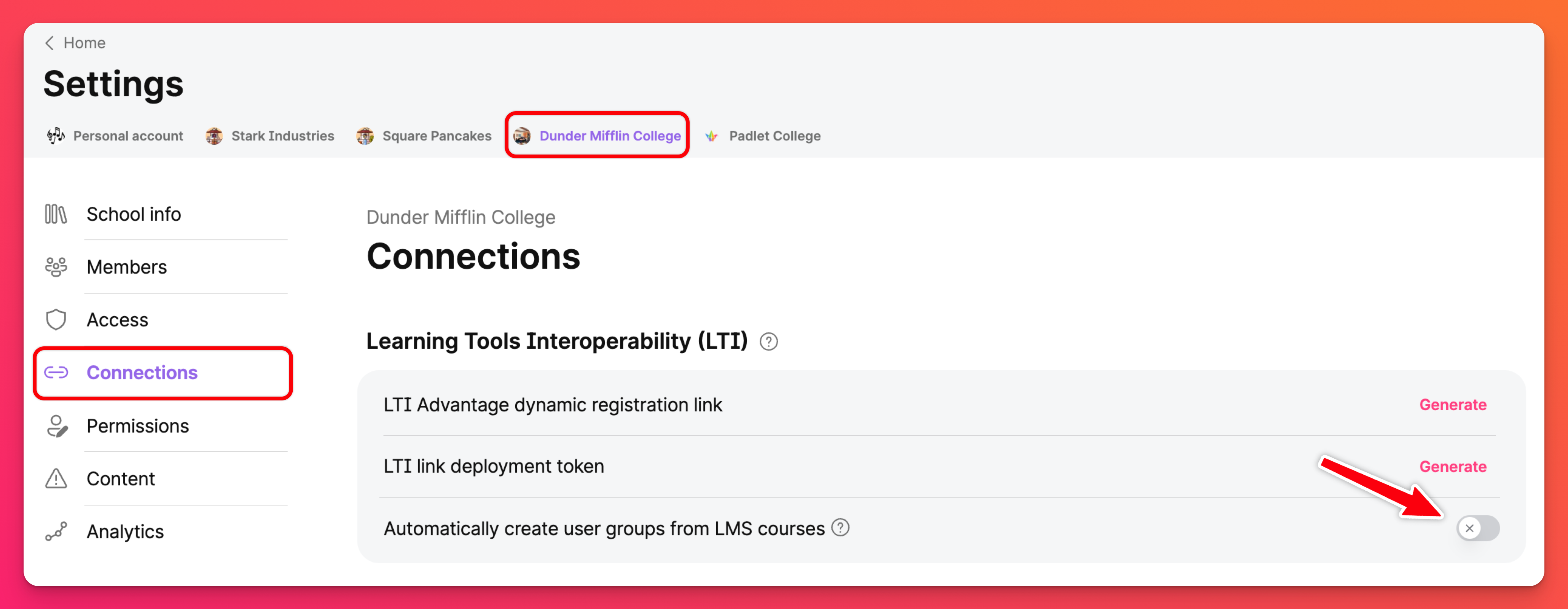
Click on the Settings cog icon in the upper-right corner of your dashboard > select your School workspace (at the top) > Organization info (under your School name on the left) > toggle the button ON next to 'Sync LMS Courses to User Groups.'
- Launch and publish a Padlet assignment in the course that you want to sync to a Padlet Class.
Now the Class will automatically sync to the LMS course once a day!
Important notes
- The name of your Class will be the course name
- When students are added to the LMS, accounts will be created for them in Padlet and they will be added to the Padlet for Schools account and Class.
- When students are removed, they will just be removed from the Class.